Customizations
It is sometimes possible - usually on quote - to customize certain Retail operations features.
Custom URL
The default url for Retail operations is https://my.storemanager.online/.
On request, it is possible to customize this URL in the https://xxxx.storemanager.online/ form, where xxxx corresponds to the name you wish to appear.
Interface customization
Ambient colors
The Retail operations interface is blue and white. The blue takes on a dark or light tint depending on the menus. On request, it is possible to replace the color with the color of your choice.
The image in the top banner can also be replaced by an image of the same size.
Homepage
On the Retail operations home screen, the left part includes images and URL links to other sites. On request, it is possible to customize this screen according to a predefined format (to be validated with the Service team). The presentation of the home screen is necessarily identical for all stores of the same company.
Workflow
The default workflow can be customized on quote to match the expected operation. We can customize the steps, appointments and tasks created automatically when passing a step, propose sending emails or add controls and blocks to the progress of steps.
Any customization request will be studied by the Service team in order to propose the best possible integration and define the cost of this customization.
“Project follow-up” screen
The columns available in the project follow-up screen can be customized on quote. Their number and name can be customized as well as the progress statuses of the flow that we want to see appear in each of the columns.
Discoveries
When creating a new customer project, two discoveries are proposed by default: a kitchen project discovery and a cupboard project discovery. Up to four discoveries can be integrated into the application upon request. The list of questions and the number of pages is not limited. The presentation of the discoveries must respect the layout available in the application. It is possible to define whether or not certain fields in the discovery must be filled in.
Any customization request must be studied by our Service team in order to validate the feasibility and cost of this customization.
Reporting customization
All printable documents in Retail operations can be customized upon request. It is also possible to integrate new documents.
A sample of each desired document must be provided to our Service team for analysis and creation of a corresponding quote.
Statistics customization
The tables available in the Retail operations “Statistics” tab can be modified upon request. New tables can also be created.
Each request must be documented in order to be studied by our Service team in order to provide a corresponding quote.
Configurable products
Upon request to our Service team, it is possible to create configurable products. These are products that require several parameters to be entered in order to define their price.
A configuration screen is then created in order to calculate the price of the product according to several criteria.
Below is a customer example for configuring a worktop:
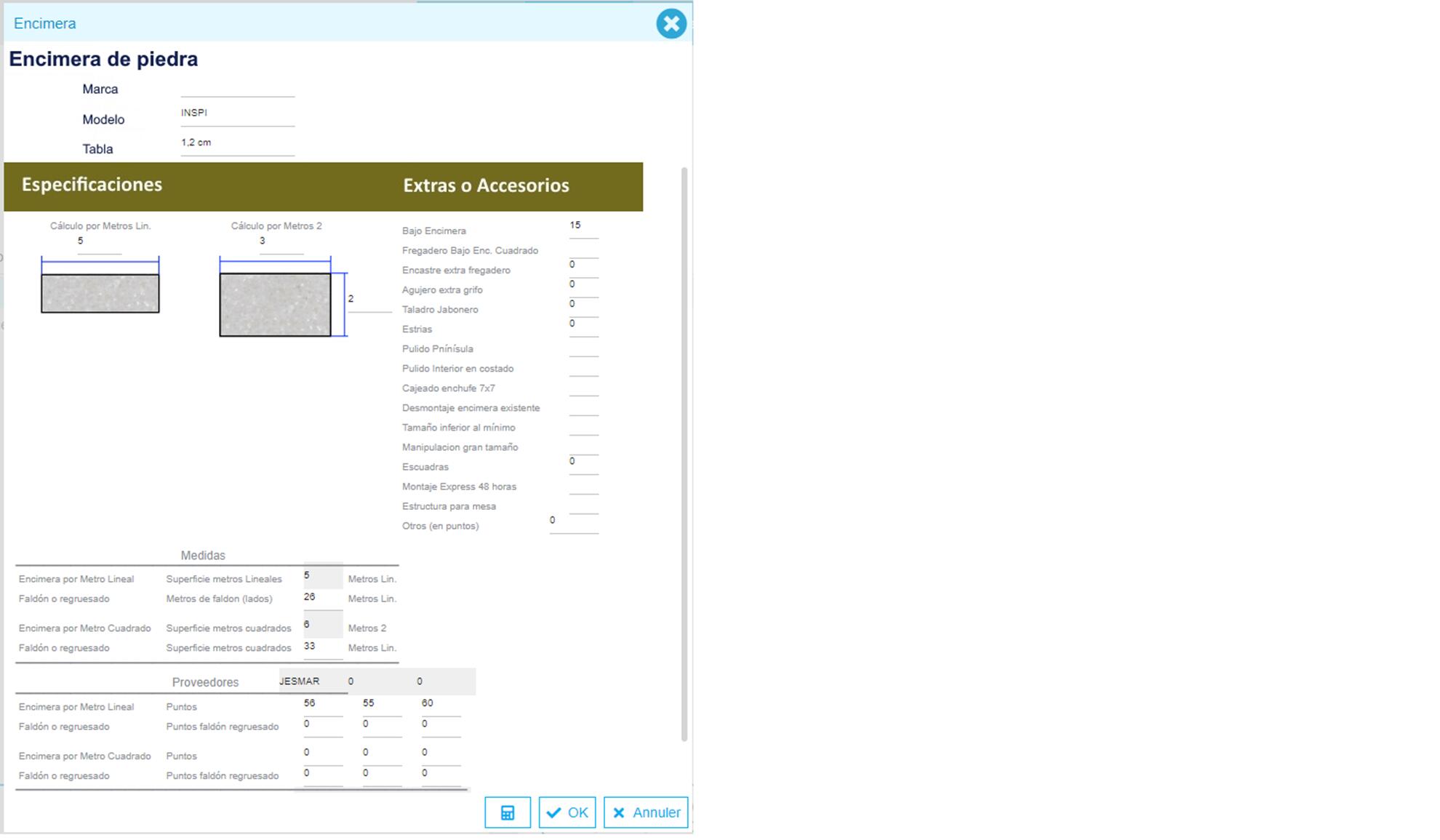
These products are added like a “classic” product but when they are added, the configuration interface opens. It is then possible to modify the product via the “Modify configuration” action available in the product.