Introduction
Working concept

In order to be able to call Retail operations REST entry points, a user first needs to get an authentication token from the Authentication dedicated service, and then use this token to be able to access all the Retail operations API methods.
REST API
The Retail operations REST API offers a subset of methods (called “externals”) for any external application integration. It is mainly considered that:
- GET requests are used to return data
- POST requests are used to create data
- PUT requests are used to update data
- DELETE requests are used to delete/cancel data
The URL of the API depends on your customer’s Retail operations URL. For example, assuming that your customer’s name is “INSPI” and your Retail operations URL is:
https://inspi.storemanager.online/ProdClients/INSPI/
Then your API URL would be:
https://inspi.storemanager.online/ProdClients/INSPI/RESTWS/
And a sample calling application could be found at:
https://inspi.storemanager.online/ProdClients/INSPI/RESTWS/swagger/
Conventions
- All Json strings returned by any entry point of the Retail operations API (except for the authentication) will always contain the following 3 tags:
{
  "success": boolean,   // false only in case of an error
  "message": string,    // Error description
  "rowCount": long      // Number of elements returned/updated
}
- An additional field is returned for all GET methods, in order to confirm the language in which the data is returned:
"winLangID": long // Windows ID of the data language
(The list of Windows Language IDs or LCID can be found here)
- In reality, in Retail operations API a DELETE method will rarely delete the target data, but most of the time simply disactivate/hide/cancel it.
- DateTime values are exported in the "yyyy-MM-ddTHH:mm:ss.fff" format. When used as input arguments (e.g. for Searching methods), the "yyyy-MM-ddTHH:mm:ss" and "yyyy-MM-dd" formats are also supported.
- By convention, in this document all arguments listed with a bold font are mandatory, others are optional. The additional information only returned when the "detailedView" argument is set to true is listed in an orange color.
idsOnly vs detailedView
Searching-related endpoints can have different types of resultsets depending on the combinations of values provided for the idsOnly and detailedView parameters :
- When the idsOnly parameter is true, only a set of ids is returned
- Else the detailedView parameter indicates the level of details
Beware of the default value of the idsOnly parameter: if its default value is set to true, then the detailedView parameter value will be ignored.
| idsOnly | detailedView | Resultset |
|---|---|---|
| false | false | Standard view |
| false | true | Detailed view |
| true | false | Only a list of ids |
| true | true | Only a list of ids |
Retail operations Data schema
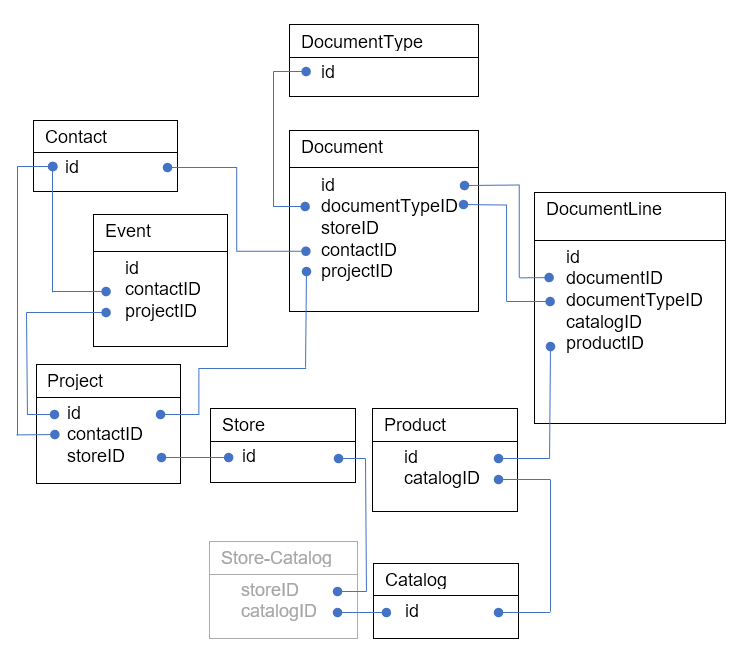
A Contact owns 0..N projects, 0..N documents, 0..N events
A Project owns 0..N documents, 0..N events
A Store owns 0..N projects, 0..N catalogs, 0..N documents
A Document type owns 0..N documents
A Document owns 0..N document lines
A Document line owns 0..1 product
A Catalog owns 0..N products