Contacts
Contact Notifications
Contact Notifications allow you to communicate with your single, centralized customer database. We also have an entry point in our API that allows you to retrieve all clients without an external system identifier. (see « Contacts without internal code »).
In the diagrams below, "SE" means external system.
Customer List
When entering a Project from the Retail Operations environment, the system can query your external system to provide a list of Customers.
The diagram below explains the back and forth between RetailOps and your system. It is built to minimize the impact on the end user, so that the communication is as transparent as possible for them, and their use of the solution seems equivalent even if your system is not available for a while.
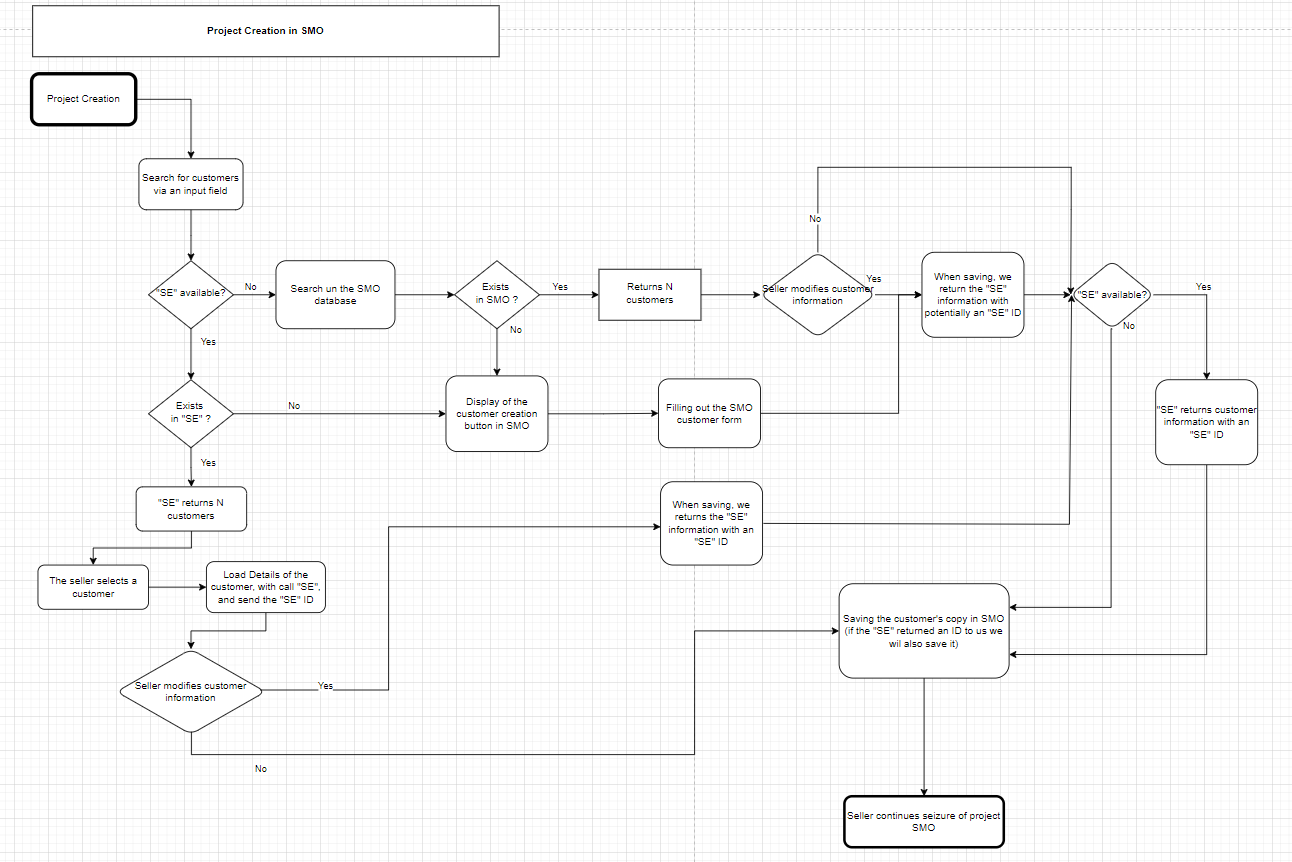
RetailOps has a search field that allows you to filter your customer list. RetailOps will call your entry point when you click the search button or press "Enter" on your keyboard. Your system should return a list of customers "lite" matching this search field. Until the user attempts a search, they will not be able to create a new customer. When the seller selects a customer, we will make a call to the external system to obtain additional information about this customer.
In the event that your system is not available, RetailOps will search for customers in its own database. RetailOps considers your system unavailable when we have an errorLevel of critical. (See "StatusCode"). This will allow users to continue creating projects.
Information transmitted
The message sent to the URL subscribed to the notification contains the following information:
- The name of the event triggered
- The Contact Type sought ("1" for Customers)
- The search string entered by the user
{
  "eventType": "contact.search",
  "entityTypeID": long, // "1"
  "data": {
    "searchString": string // Search string
  }
}
Expected response
The response that must be returned by the external system subscribed to the notification must contain several pieces of information:
- Was the notification processing successful?
- If yes, the list of Contacts corresponding to the search criteria provided
- Otherwise, the details of the error that may have been raised
- Special case for this notification: if an errorLevel of OK (whether the request was successful or not) is returned with a message it will be displayed in the customer list sheet
{
  "success": boolean,
  "message": string,
  "errorLevel": int,
  "errorCode": string,
  "data": [
    { JSON structure of a Contact }, { JSON structure of a Contact }, ...
  ]
}
The content of the data structure is equivalent to that generated by a call to the REST API "Contact Search".
This data could be more "lite" to only have the information to display in the Retail operations grid.
In particular this list:
- Name
- First name
- Postal Code
- City
- Mobile phone number
Customer detail
The Notification is triggered when loading the complete details of a Contact in Retail operations.
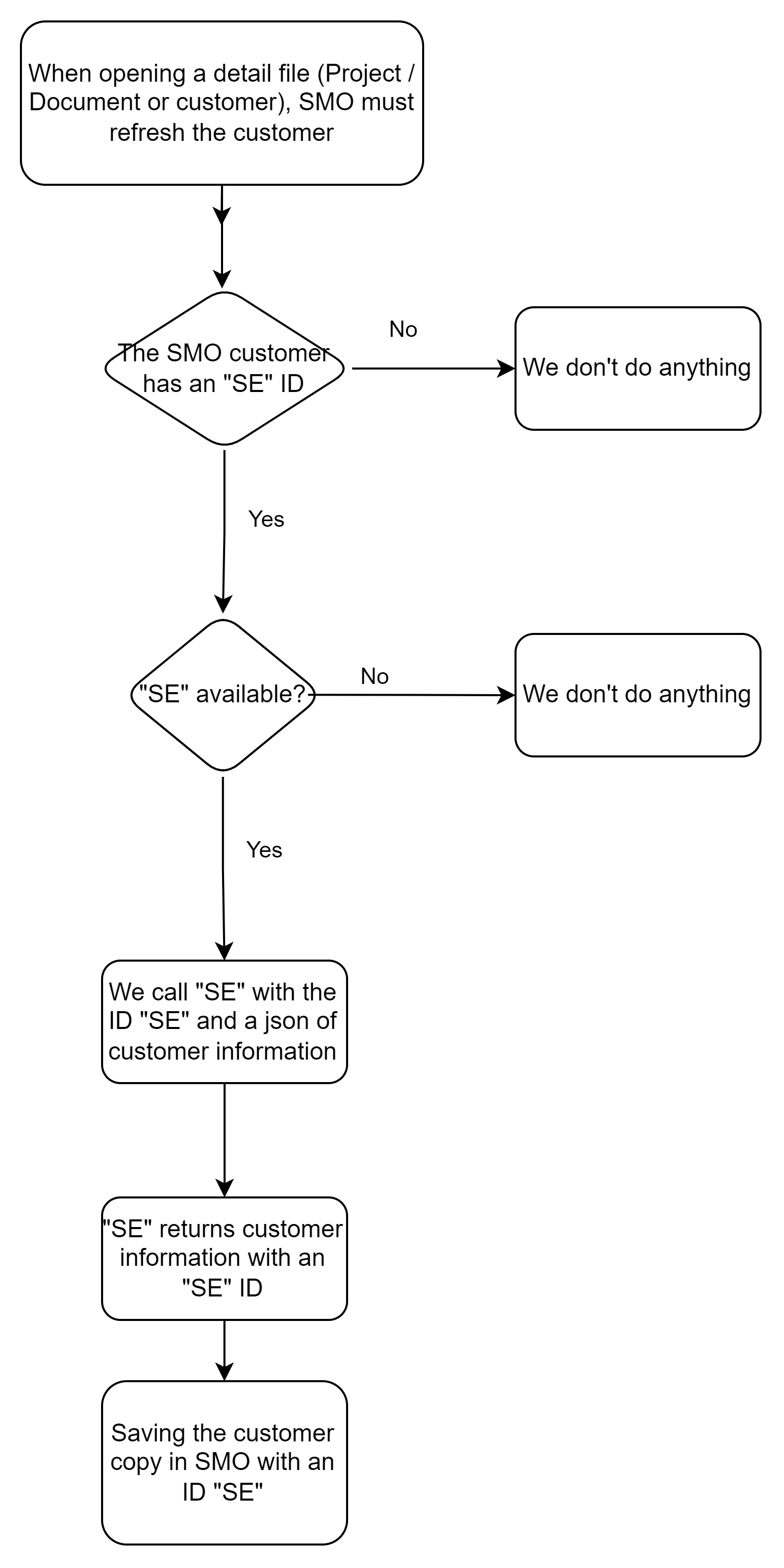
Sending a complete json with all the information from the RetailOps database. The SE will return this same json with the information it has merged and updated. This json will be saved in the RetailOps database.
Information transmitted
The message sent to the URL subscribed to the notification contains the following information:
- The name of the event triggered
- The Type ("1" for Customers) and the identifier of the Contact concerned
- The complete detail in JSON format of the Contact concerned
{
  "eventType": "contact.details",
  "entityTypeID": long, // "1"
  "entityID": long, // Contact Identifier
  "data": { JSON structure of the Contact } // Full details of the relevant Contact
}
The content of the data structure is equivalent to that generated by a call to the REST API "Contact Search".
Expected response
The response that must be returned by the external system subscribed to the notification must contain several pieces of information:
- Was the notification processing successful?
- If yes, the corrected details of the Contact concerned
- If not, the details of the error that may have been raised
{
  "success": boolean,
  "message": string,
  "errorLevel": int,
  "errorCode": string,
  "data": { JSON structure of the Contact } // Full details of the relevant Contact
}
The content of the data structure is equivalent to that generated by a call to the REST API "Contact Search".
Customer Creation/Update
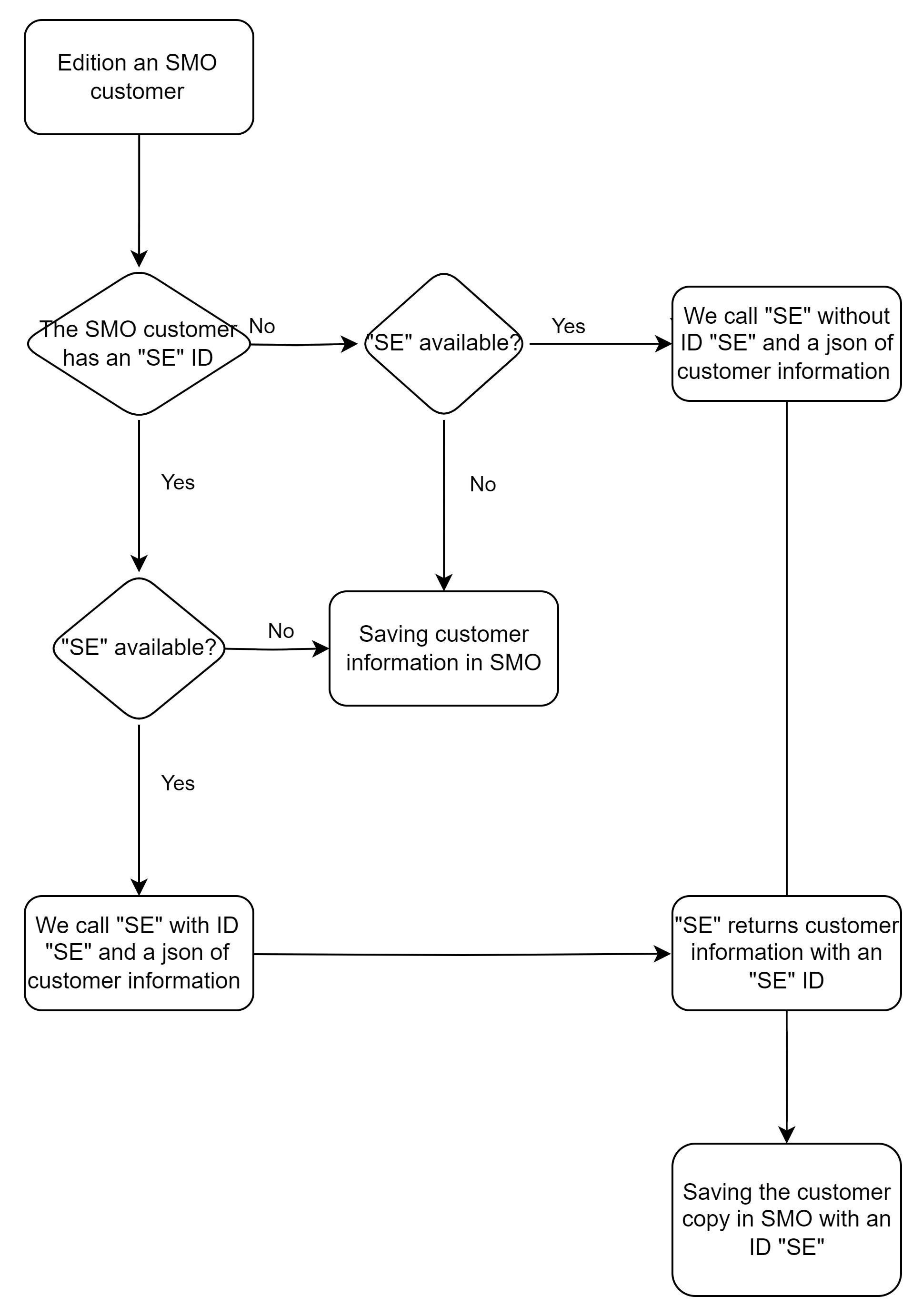
Sending a complete json with all the information updated in the RetailOps frontend by the user. The SE will return this same json with the information it has merged and updated. This json will be saved in the RetailOps database.
Information transmitted
The message sent to the URL subscribed to the notification contains the following information:
- The name of the event triggered
- The Type ("1" for Customers) and the identifier of the Contact concerned
- The complete detail in JSON format of the Contact concerned
{
  "eventType": "contact.validation",
  "entityTypeID": long, // "1"
  "entityID": long, // Contact Identifier
  "data": { JSON structure of the Contact } // Full details of the relevant Contact
}
The content of the data structure is equivalent to that generated by a call to the REST API "Contact Search".
Expected response
The response that must be returned by the external system subscribed to the notification must contain several pieces of information:
- Was the notification processing successful?
- If so, the corrected details of the Contact concerned
- Otherwise, the details of the error that may have been raised
{
  "success": boolean,
  "message": string,
  "errorLevel": int,
  "errorCode": string,
  "data": { JSON structure of the Contact } // Full details of the relevant Contact
}
The content of the data structure is equivalent to that generated by a call to the REST API "Contact Search".