Documents
Document Notifications
Document Notifications allow you to alert a potential external document management or billing system of changes made by your users from their Retail operations environment. We also have an entry point in our API that allows you to update a document's external system identifier (see « Document Update »).
In the diagrams below, "SE" means external system.
Document Validation
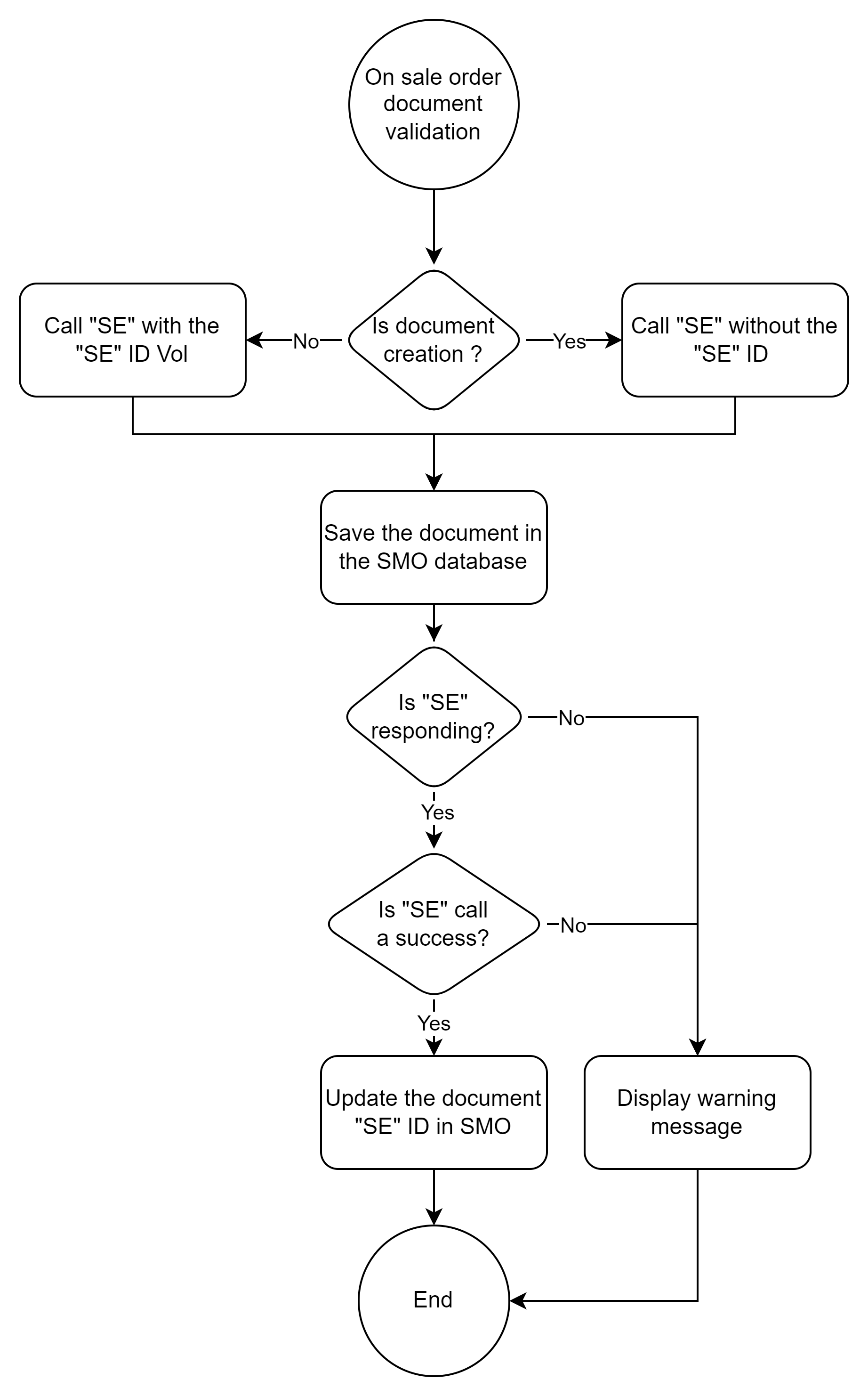
The Notification is triggered synchronously when the Retail operations user clicks on the "Save" button of their Document. At this time, the system will notify a potential subscriber of the validation of their document. The diagram below explains the back and forth between RetailOps and your system.
The "Edit the document" and "Save" buttons are only visible to Customers who have activated the option. By default, changes are validated permanently and do not trigger any notifications.
Before triggering a Validation Notification on a Document, the system will first check that the document in question has changed since the last Notification triggered against it, in order not to raise unnecessary alerts when no changes have been made.
Information transmitted
The message sent to the URL subscribed to the notification contains the following information:
- The name of the event triggered
- The Type and identifier of the Document concerned
- The complete detail in JSON format of the Document concerned
{
  "eventType": "document.validation",
  "entityTypeID": long, // Type Identifier of the relevant Document
  "entityID": long, // Identifier of the relevant Document
  "data": { JSON Structure of the Document } // Full details of the relevant Document
}
The content of the data structure is equivalent to that generated by a call to the REST API "Document Search".
The internalCode property will only be filled in if the Document has already been notified to the external system.
Expected response
The response that must be returned by the external system subscribed to the notification must contain several types of information:
- Was the integration of the notification successful?
- If so, under which reference was the Document integrated into the system?
- Otherwise:
- Provide the details of the error that may have been raised
- Do we need to validate the Retail operations document anyway (cf. "forceValidation" below)?
{
  "success": boolean,
  "message": string,
  "errorLevel": int,
  "errorCode": string,
  "forceValidation": boolean,
  "data": {
    "internalCode": string // Document Reference for Linked External System
  }
}
forceValidation
The forceValidation option allows the external system to return an error (success = false), but requires Retail Operations to complete its validation process. This can be useful when some information is missing but not mandatory, and allows the end-user to save his document anyway.
In this case, a visual indicator will appear on the "Edit the document" button of the related document, in order to alert the end user of this potential difference in information between both systems.

The end-user will have to save again his document later in order to try again synchronizing them. A tooltip over the same button indicates the date of the last successful notification.
Please use this option with caution, as the two solutions (Retail Operations and SE) may end up with out-of-sync versions of the same document.
Document Cancellation
The Notification is triggered asynchronously when a Retail operations user cancels a Document in one of his projects.
Since the Notification is asynchronous, the External system may not be immediately notified: it may take a short moment before the Webhook is triggered. Thus, Retail Ops does not expect nor manage any response from the External system.
Information transmitted
The message sent to the URL subscribed to the notification contains the following information:
- The name of the event triggered
- The Type and identifier of the Document concerned
{
  "eventType": "document.cancellation",
  "entityTypeID": long, // Type Identifier of the relevant Document
  "entityID": long // Identifier of the relevant Document
}
The External System can call Retail Ops API in order to get more details about the related Document, by using the value of the entityTypeID & entityID tags in order to fill in the documentTypeID & documentID arguments required in several methods, such as the Document details.
Document Pricing
BETA Notification is currently available as a Beta and the information contained in this document is subject to change. This means that some features are not yet implemented and others may be changed before the tag beta is removed.
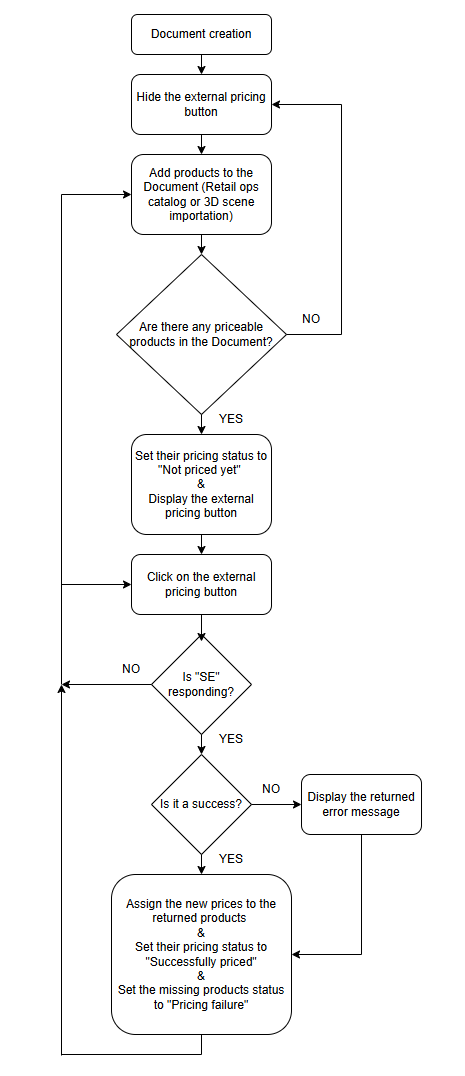
This Notification allows a given External system to compute/override the prices of a list of Products, and eventually assign them different values depending on the context of a given Store. Thus, the External system has the ability to centralize the pricing of items which prices may change frequently (e.g. appliance), or quickly react to cost raises or to the prices offered by the competitors.
The Notification is triggered synchronously when the Retail operations user clicks on the "Refresh price" button of his Document (calculator icon on the bottom of his Document).
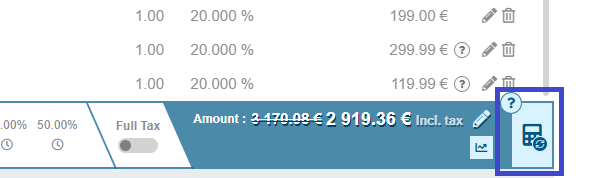
This button will only be visible in certain conditions:
- An URL must be set as a subscription to the Notification
- One or more Products of the active Document must be configured in order to be able to trigger an External pricing call. Example configuration for HBM data here
Information transmitted
The message sent to the URL subscribed to the notification contains the following information:
- The name of the event triggered
- The Type and identifier of the concerned Document
- The Store and Currency of the concerned Document
- The complete list in JSON format of the priceable items (products) in the concerned Document. In order to simplify the full JSON, the eventual items with same properties (Catalog, EAN Code) are grouped in a single structure, and their quantities are summed up.
{
  "eventType": "document.pricing",
  "entityTypeID": long, // Type Identifier of the relevant Document
  "entityID": long, // Identifier of the relevant Document
  "data": {
    "storeCode": string,  // Code of the current Store
    "currencyCode": string, // Currency code of the relevant Document
    "items": [
      {
        "catalogInternalCode": string, // Internal code of the Product Catalog
        "eanCode": string, // Product EAN Code
        "tax1Rate": double, // Product Tax1 rate in the relevant Document
        "tax2Rate": double, // Product Tax2 rate in the relevant Document
        "tax3Rate": double, // Product Tax3 rate in the relevant Document
        "quantity": double // Product Quantity in the relevant Document
      }
    ]
  }
}
Expected response
The response that must be returned by the external system subscribed to the notification has to contain several types of information:
- Was the notification call successful?
- The List of completed Products with both their unit Sales price and unit Cost price in the Context of the active Store. Returned prices must be per unit, and excluding taxes and eco-participations.
{
  "success": boolean,
  "message": string,
  "errorLevel": int,
  "errorCode": string,
  "data": {
    "storeCode": string,  // Confirmation of the current Store Code
    "currencyCode": string, // Confirmation of the Currency Code in which the prices are specified
    "validityDate": datetime, // Optional Validity date for the given prices
    "items": [
      {
        "catalogInternalCode": string, // Confirmation of the Product Catalog Internal Code
        "eanCode": string, // Product EAN Code
        "unitCostPrice": double, // Corrected unit Cost price of the Product
        "unitSalesPrice": double // Corrected unit Sales price of the Product
      }
    ]
  }
}
Please notice that even if the External system returns a "success" = false status, the eventual list of completed items returned with the answer will be processed by Retail operations. The message also returned will be displayed as a Warning popup.
This allows the External system to return an error when some items could not be priced (e.g. because of a missing or wrong EAN Code) but to price the correct ones anyway.
Visual indicators
Several visual indicators are displayed in order to help the end-user to determine if he needs to call the external pricing process.
- Not priced yet
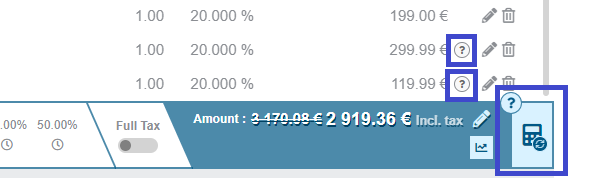
These two icons indicate the presence in the Document of one or more items who are flagged for an external pricing, but their related pricing system was not called yet. The end-user can click on the calculator button or directly on the line question mark icon in order to cal this external pricing.
Please notice that even if the end-user chooses the line icon option, the whole list of priceable items in the document will be sent to the external pricing system in order to be priced.
-
Priced with success
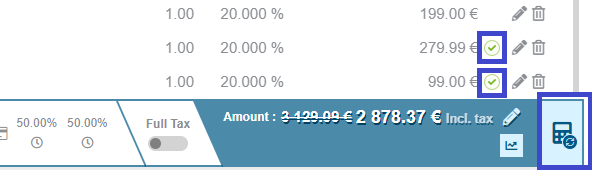
The items which related external pricing icon is green were successfully priced by the external system. The gobal question mark indicator over the calculator icon has disappeared because none failed. -
Priced with failure
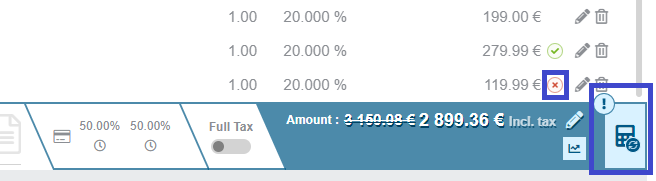
One or more items could not be successfully priced by the external pricing system call. This external system returned an error but also gave some prices for the valid elements. The items in error are assigned an error pricing icon, and the global indicator over the document calculator is assigned an exclamation mark indicating the fact that the whole document could not be successfully priced. The end-user can click on the calculator button or directly on the line error icon in order to cal this external pricing.
Please notice that even if the end-user chooses the line icon option, the whole list of priceable items in the document will be sent to the external pricing system in order to be priced.
Payment Validation
BETA Notification is currently available as a Beta and the information contained in this document is subject to change. This means that some features are not yet implemented and others may be changed before the tag beta is removed.
The Notification is triggered synchronously when the Retail operations user clicks on the "Pay" button of a Payment condition of their Document. At this time, the system will notify a potential subscriber of the validation of their payment. This notification can be either a simple API call or an iFrame display.
Information transmitted
The message sent to the URL subscribed to the notification contains the following information:
- The name of the event triggered
- The Type and identifier of the Document concerned
- The detail in JSON format of the Document payment condition concerned, including the Amount to be paid in the specified Currency
{
  "eventType": "payment.validation",
  "entityTypeID": long, // Type Identifier of the relevant Document
  "entityID": long, // Identifier of the relevant Document
  "data": {
    "documentTypeID": long,
    "documentID": long,
    "storeID": long,
    "currencyCode": string,
    "amount": double,
    "paymentMethod": {
      "id": long,
      "description": string,
      "isADeposit": boolean
    },
    "paymentType": {
      "id": long,
      "description": string
    }
  }
}
Expected response
The response that must be returned by the external system subscribed to the notification must contain several types of information:
- Was the integration of the notification successful?
- If so, what is the new status of the specified Payment term (cf. Payment status possible values)? And (optionnally) under which reference?
- Otherwise:
- Provide the details of the error that may have been raised
{
  "success": boolean,
  "message": string,
  "errorLevel": int,
  "errorCode": string,
  "data": {
    "status": string, // New Status for the payment condition
    "internalCode": string // Reference of the Payment in the Linked External System
  }
}
Payment Validation
BETA Notification is currently available as a Beta and the information contained in this document is subject to change. This means that some features are not yet implemented and others may be changed before the tag beta is removed.
If the notification is defined as an IFRAME, an IFRAME will pop-up when the Retail operations user clicks on the "Pay" button of a Payment condition in their Document. The Url set for the notification will open with additionnal parameters allowing the integrator to call our API to get the payments or mark them as paid.
URL arguments
storeID: ID of the store associated with the paymentobjectTypeID: ID of the RetailOps type of objectentityID: ID of the document associated with the paymententityTypeID: ID of the type of document associated with the paymentpaymentMethodID: ID of the payment method. This ID is unique by documentlocalisation: Language code of RetailOps interface ('fr', 'en', 'gb', 'es', ...)winLangID: Windows Language Identifier to specify when using the API
Supported postMessages
IFRAME communication is identical to Electronic Signature.
Retail Ops does not send iframe messages and only supports those specified in the documentation, the only information sent is contained in the URL parameters.