Subscribing to Notifications
Notification subscriptions
Notifications subscriptions are configured in the Retail operations backoffice. In this screen, you will be able to establish connections between your system and Retail operations.
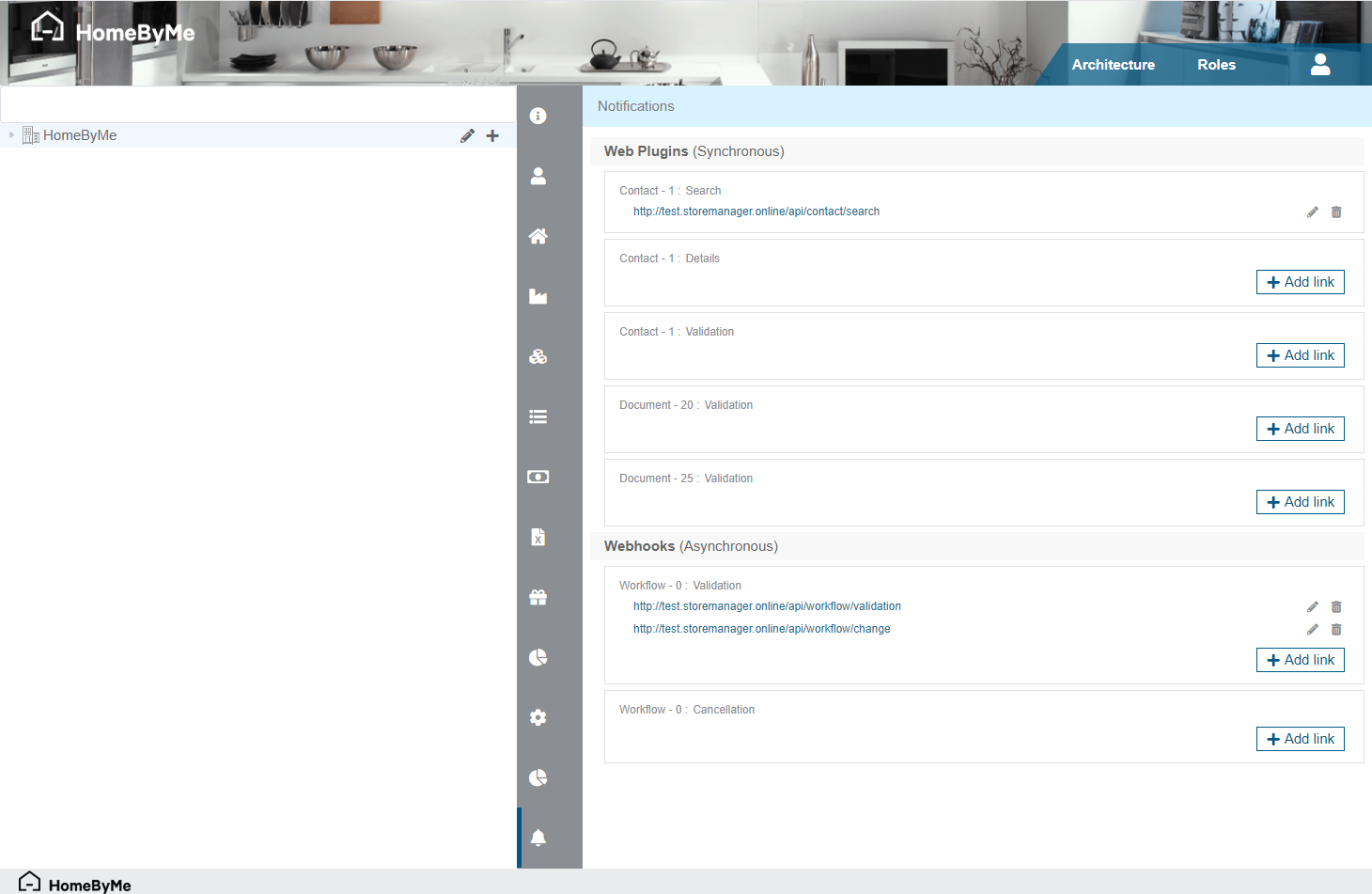
The list of available notifications and their subscriptions is split in two sections: Web Plugins (sync) and Webhooks (async). Since Web Plugin notifications are triggered synchronously, they can accept only one single URL, whereas Webhooks are triggered asynchronously and will accept a list of URLs.
For each notification (cf. Entities concerned), clicking on the "+ Add link" button opens a screen that will ask you for the URL that will be called, and an optional API Key that will be passed to each request.
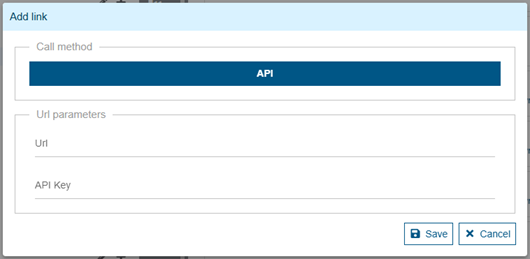
The optional API Key will be added to each request in an X-API-KEY Http header.
You can use it in order to identify the request in your system.
iFrame integration
A few sync notifications (not all) support both "API" and "IFRAME" integration methods.
In case you're trying to add a new link for a sync notification allowing both methods, the "Call method" section of the dialog box will allow you to choose the integration kind ("API" or "IFRAME"). A visual indicator on the left of the linked URL will show the iframe choice:

Webhooks & Deltas
Some additional information relates more specifically to Webhooks and Deltas.
Deltas activation
Activating Deltas is done in 2 ways:
- Automatically: If you have subscribed one or more URLs to a Webhook, Deltas will be automatically enabled.
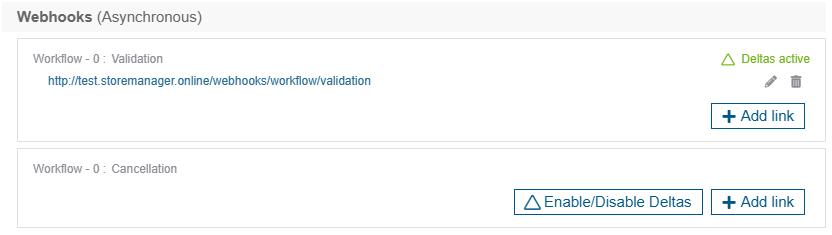
- Manually: However, a Webhook without a subscription does not necessarily enable Deltas. You must explicitly request this via the "Enable/Disable Deltas" button.
A green indicator displays the activation status of Deltas on a given asynchronous Notification.
Webhook subscriptions status
Hover your mouse over the URL corresponding to a subscription in order to see the status of the last call attempt by our webhooks appear in a tooltip.
Several types of messages can be displayed depending on the use case:
- "
Last status: Successful on {last call date}": The last call to the specified URL worked successfully. - "
Last status: Failed on {last call date}": The last call to the specified URL failed. - "
In error since {start of failure period}": Multiple successive calls to the URL have failed over a period of at least 12 hours, with no successful attempt to interrupt the sequence. The URL in question is then considered "locked" by the Webhooks system (see Locked subscriptions below) - (nothing): No call to the specified URL has been attempted yet.
The External Applications Logs sheet allows you to access the detailed history of the different calls.
Keep in mind that there may be a delay of several minutes between the moment when a user takes an action that might trigger a webhook and when it is processed.
Locked subscriptions
When an uninterrupted succession of failed calls has occurred over a period of at least 12 hours for the same duo [URL - API Key], the Webhooks system will decide to isolate them and stop trying to contact them, in order to avoid overloading the Logs with untimely failures. The corresponding subscription will then be displayed in red with a strikethrough in the list, in order to alert you about its status:

The "Click here to reactivate" link allows you to request to reactivate the subscription.