BOM Format
Universal Import BOM format
The Universal Import BOM format is composed of 2 parts:
- A commercial part, named
document(cf.Document) - A graphical part, named room3D
{
  "version": int,
  "externalApplicationID": int,
  "document": Document,
  "settingID": int,
  "room3D": 3DInfo
}
| property | type | cardinality | comment |
|---|---|---|---|
| version | int | M | Should be the latest version of the format (1) |
| externalApplicationID | int | M | Your external application ID |
| document | Document | M | The document containing all the commercial information |
| settingID | int | C | The settingID if given in the OpenConfigurator message |
| room3D | 3DInfo | C | The 3D positionning information of the object in the scene. Used for EDI |
cardinality
M: Mandatory valueC: Conditional value. If you do not want to provide a value, just don't send the parameter.
Commercial document
Document
The Document structure contains all the relevant commercial information that may be imported.
document:
{
  "currencyCode": string,
  "catalogs": Catalog[],
  "styles": Style[],
  "lines": Line[]
}
| property | type | cardinality | comment |
|---|---|---|---|
| currencyCode | string | M | ISO 4217 code for the currency used by all monetary amounts in this import. See: Company Currency |
| catalogs | Catalog[] | M | Array of unique catalogs referenced by the document lines |
| styles | Style[] | M | Array of unique styles referenced by the document lines |
| lines | Line[] | M | Array of lines for the document to be imported |
Line
A Line represent a commercial item.
All dimensions (Width, Height, Depth) are to be supplied in mm for Metric catalogs and inch for Imperial catalogs.
Weight: KiloGrammes
Volume: CubicMeter m3
VolumetricMass: kg/m3 KiloGrammes per CubicMeter
line:
{
    "parentLineIndex": int, // (parentID), ref: document.lines[{parentLineIndex}]
    "description": string,
    "notes": string,
    "styleIndex": int, // ref: document.styles[{styleIndex}]

    "quantity": decimal,
    "quantityUnit": string, // (ENUM: [PCE]: PieCE / unit, [LM]: LinearMeter, [LDM]: LinearDeciMeter, [SQM]: SQuareMeter) Default [PCE]
    "unitCostPrice": decimal, // (Default 0)
    "unitSalesPrice": decimal,
    "tax1Rate": decimal, // in %, 20 = 20%
    "tax2Rate": decimal,
    "tax3Rate": decimal,
    "discountPercentage": decimal, // in %, 20 = 20% discount

    "blockLineType": string, //  (ENUM: [OOB]: OutOfBlock, [B]: Block, [BO]: BlockOverage, [BI]: BlockItem) default to [OOB]
    "countermark": string,
    "plannerUniqueID": int,
    "plannerLineNumber": string,

    "hinging": string, // (ENUM: [L]eft, [R]ight, [B]ottom, [T]op, [N]one)
    "plinthHeight": decimal,
    "overrideWidth": decimal,
    "overrideHeight": decimal,
    "overrideDepth": decimal,
    "overrideWeight": decimal,
    "overrideVolume": decimal,

    "specificBehavior": {
        "noPrintOnSalesDocument": bool,
        "noPrintOnPurchaseDocument": bool,
    },

    "product": Product
}
Line properties
| property | type | cardinality | default | comment |
|---|---|---|---|---|
| parentLineIndex | int | C | null | The index of the parent line ref: document.lines[{parentLineIndex}] |
| description | string | C | "" | The short description of the line |
| notes | string | C | "" | The long notes of the line |
| styleIndex | int | C | null | The style index of this line ref: document.styles[{styleIndex}] |
| quantity | decimal | M | The quantity of the line | |
| quantityUnit | string | M | PCE | The Unit of quantity:PCE: PieCE / unitLM: LinearMeterLDM: LinearDeciMeterSQM: S QuareMeter |
| unitCostPrice | decimal | M | The unitary cost price of the line without taxes | |
| unitSalesPrice | decimal | M | The unitary sales price of the line without taxes | |
| tax1Rate | decimal | C | null | The tax1 rate for this line in % ex: 20 = 20% tax rate |
| tax2Rate | decimal | C | null | The tax2 rate for this line in % ex: 20 = 20% tax rate |
| tax3Rate | decimal | C | null | The tax3 rate for this line in % ex: 20 = 20% tax rate |
| discountPercentage | decimal | M | The discount percentage in % ex: for a 20% discount, discountPercentage = 20 | |
| blockLineType | string | C | OOB | If this line is a block line, the type of block:OOB: OutOfBlockBI: BlockItemB: BlockBO: BlockOverage |
| countermark | string | C | "" | The countermark of the line |
| plannerUniqueID | int | M | The unique id of this line given by the configurator, used to follow and recognize lines between imports | |
| plannerLineNumber | string | C | null | The configurator line number for this line |
| hinging | string | C | null | The hinging orientation, when applicable:L: LeftR: RightM: BothB: BottomT: TopN: None |
| plinthHeight | decimal | C | null | The height in millimeters of the product plinth |
| overrideWidth | decimal | C | null | Must be filled if you have a custom Width compared to the original catalog product Width |
| overrideHeight | decimal | C | null | Must be filled if you have a custom Height compared to the original catalog product Height |
| overrideDepth | decimal | C | null | Must be filled if you have a custom Depth compared to the original catalog product Depth |
| overrideWeight | decimal | C | null | Must be filled if you have a custom Weight compared to the original catalog product Weight |
| overrideVolume | decimal | C | null | Must be filled if you have a custom Volume compared to the original catalog product Volume |
| specificBehavior | SpecificBehavior | C | null | Contains specific behaviors that can be applied to the line |
| product | Product | M | The product detail of the line |
SpecificBehavior
| property | type | cardinality | default | comment |
|---|---|---|---|---|
| noPrintOnSalesDocument | bool | C | false | This line will be omitted on sales reports |
| noPrintOnPurchaseDocument | bool | C | false | This line will be omitted on purchase reports |
Taxes
See Company taxes
Blocks
Block are a type of pricing method used by the furniture market:
- OOB / OutOfBlock: are document lines that are not part of the block.
- BI / BlockItem: are document lines that are part of the block.
- B / Block: is the ligne that represents the chosen block and owns the block price.
- BO / BlockOverage: are the sublines of the blocks that represent the reduction that this block offers on the document.
Product properties
{
  "code": string,
  "finish": string,
  "category": string,
  "ediLongArticleType": int, // ENUM
  "primaryType": string,
  "secondaryType": string,
  "eanCode": string,
  "manufacturerCode": string,
  "description": string,
  "notes": string,

  "ecoTax": { // DEEE, WEEE
    "organizationCode": string, // from a supportedList
    "code": string,
    "unitAmount": decimal,
  },

  "ecoPart": { // DEA
    "organizationCode": string, // from a supportedList
    "productCode": string,
    "isAFixAmount": bool,
    "unitAmount": decimal,
    "unitCount": decimal,
  },

  "catalogIndex": int,

  "width": decimal,
  "height": decimal,
  "depth": decimal,

  "weight": decimal,
  "volume": decimal,
  "volumetricMass": decimal,

  "specificBehavior": {
    "externalPricing": bool | null,
  },

  "pictureUrl": string // http(s) url of the image
}
| property | type | cardinality | default | comment |
|---|---|---|---|---|
| code | string | M | Product code | |
| finish | string | M | Product finish | |
| category | string | M | Main category of the product. Should correspond with the Retail Ops category mapping. | |
| ediLongArticleType | int | C | null | The EDILongArticle type if this is a long article (linears). See ediLongArticleType |
| primaryType | string | C | "" | The primary type (primary and secondary types are used for exemple in the Installation and services) |
| secondaryType | string | C | "" | Secondary type |
| eanCode | string | C | null | The EAN code of the product |
| manufacturerCode | string | C | "" | The Manufacturer code of the product |
| description | string | C | "" | Short description |
| notes | string | C | "" | Long notes on the product |
| ecoTax | EcoTax | C | If applicable, the WEEE tax information | |
| ecoPart | EcoPart | C | If applicable, the Appliance recycling tax information EcoParticipation / French EcoMobilier / DEA | |
| catalogIndex | int | M | The index of the catalog ref: document.catalogs[{catalogIndex}] of this product | |
| width | decimal | M | ||
| height | decimal | M | ||
| depth | decimal | M | ||
| weight | decimal | C | 0 | |
| volume | decimal | C | 0 | |
| volumetricMass | decimal | C | 0 | |
| specificBehavior | SpecificBehavior | C | 0 | |
| pictureUrl | string | M | http(s) url of the image |
ediLongArticleType
| ID | Name |
|---|---|
| 1 | Plinth |
| 2 | Worktop |
| 3 | Wall seal profile |
| 4 | Light pelmet |
| 5 | Cornice |
| 6 | Projecting cornice panel |
| 7 | Railing |
| 8 | Ceiling infill panel |
| 99 | Obstacle |
SpecificBehavior
| property | type | cardinality | default | comment |
|---|---|---|---|---|
| externalPricing | bool | C | false | true if this product is used to call the External pricing feature |
EcoTax
| property | type | cardinality | default | comment |
|---|---|---|---|---|
| organizationCode | string | M | The code of the organization. See Supported EcoTax organizations | |
| code | string | M | The tax code used | |
| unitAmount | decimal | M | The unitary price of the tax |
Supported EcoTax organizations
| Name | Code |
|---|---|
| Eco-système | ECOSYSTEM |
| Ecologic | ECOLOGIC |
EcoPart
| property | type | cardinality | default | comment |
|---|---|---|---|---|
| organizationCode | string | M | The code of the organization. See Supported EcoPart organizations | |
| code | string | M | The used tax code | |
| isAFixAmount | bool | M | true if the tax is a fix value that do not depends on the quantity of the line | |
| unitAmount | decimal | M | The unitary price of the tax | |
| unitCount | decimal | M | The quantity of tax present in 1 quantity of the line |
Supported EcoPart organizations
| Name | Code |
|---|---|
| Eco-maison | ECOMAISON |
| Valdelia | VALDELIA |
| Valobat | VALOBAT |
| Valobat PMCB | VALOBAT_PMCB |
Catalog
The different catalogs that will be used by the document.
catalog:
{
  "code": string,
  "externalCode": string,
  "measurementUnit": string //(ENUM: [M]etric, [I]mperial)
}
| property | type | cardinality | comment |
|---|---|---|---|
| code | string | M | The code of the catalog, used to identify it. This code is used in order to match existing catalogs (and then refer them), or else create a new one |
| externalCode | string | M | Your code for this catalog |
| measurementUnit | string | M | The typeof measurement used in this catalog:M: MetricI: Imperial |
Style
The different styles that are used by the document lines.
They are declared here so that if several lines have the same style, they can reference the same styleIndex instead of repeating all the styles information.
style:
{
  "code": string,
  "orderCode": string,
  "catalogIndex": int,
  "description": string,
  "notes": string,
  "features": [
    {
      "code": string,
      "orderCode": string,
      "description": string,
      "notes": string,
      "option": {
        "code": string,
        "orderCode": string,
        "description": string,
        "notes": string
      }
    }
  ]
}
Style information are organized in 3 concepts:
Style
Corresponds to the main style of an item, and contains the list of customizable Features (e.g. properties) of this Style, with their selected Option (e.g. value).
Ex: A cabinet can be assigned the "Industrial" Style/Range from its related catalog.
Feature
Then the Style can propose variations of certain Features of the cabinet, with their selected Option.
Ex: The "Industrial" Style can propose multiple properties (e.g. "Front", "Handle", etc.), which are the Features of this Style.
Option
And finally you have the Option that is the value you have chosen for a Feature. Ex: For the "Handle" feature, you may want the "Vertical anodized black" handle on your cabinet.
The Style, Feature and Option have the same set of parameters:
| property | type | cardinality | comment |
|---|---|---|---|
| code | string | M | The seller code for this (Style/Feature/Option) |
| orderCode | string | M | The manufacturer code for this (Style/Feature/Option) |
| catalogIndex | int | M | The catalog in which this (Style/Feature/Option) is present |
| description | string | C | The short commercial name of this (Style/Feature/Option) |
| notes | string | C | The long notes of this (Style/Feature/Option) |
| style.features | Feature[] | M | The Feature list of this Style |
| feature.option | Option | M | The selected Option for this Feature |
3D positioning information
In case you want to be able to send your imported data to a manufacturer with the positioning of the objects in the scene, then you need to fill in the 3DInfo section of the import format.
These data are required in order to generate the EDI file owning the positioning information.
You should only include the articles present in the import and which are needed for the manufacturing / order.
Do not include decorative items.
3D Coordinates System
- Cartesian Coordinates System (right-handed system).
- The X/Y axis is the floor plane.
- The Z axis specifies the height.
- Both positive and negative coordinates are permitted.
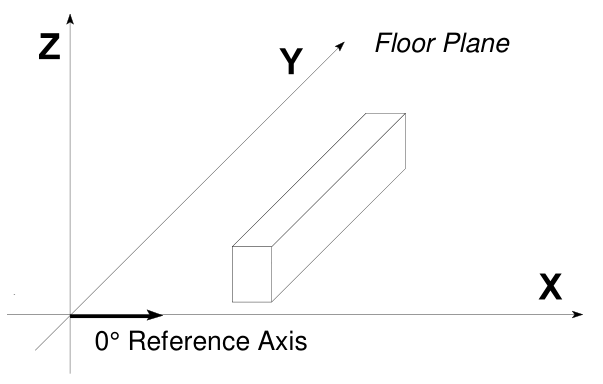
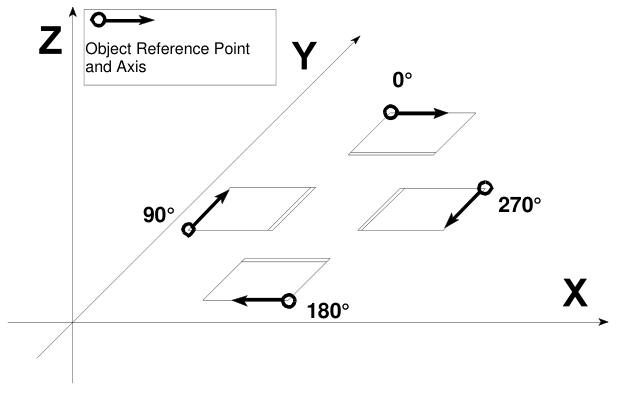
- Each object has a reference point, spatial orientation, maximum extension and any additional special characteristics. The object's position is determined by the absolute coordinates of the reference point.
- An object's alignment is determined by a rotation around the Z axis. The angle results from the X axis as well as the object's reference axis. Rotation is in degree using the trigonometric rotation (anti-clockwise).
Units
- position / distance / dimensions are defined as float in millimeters
- angles are float in degree, using the trigonometric rotation (anti-clockwise)
Cardinality
Field can be M for Mandatory of C for conditional.
Some conditional fields can become Mandatory if you filled other conditional fields.
All mandatory fields are in bold.
3DInfo object structure
3DInfo:
{
  "roomHeight": float,
  "roomConstruction": {
    "walls": Wall[],
    "doors": Door[],
    "windows": Window[],
    "recesses": Recess[],
    "hindrances": Hindrance[],
    "radiators": Radiator[],
    "roofSlopes": RoofSlope[],
  },
  "articles": Article[]
}
Position
In this format, all Position objects are an array of 3 float values representing the x, y & z coordinates.
ex:
=> absolutePos: Position
=> absolutePos: [x, y, z]
=> absolutePos: [float, float, float]
=> absolutePos: [14.5, 56.1, 2.4]
Wall
Since the decisive information for planning is usually placed inside walls, walls are used to describe a room.
Walls are specified as an area (width x height); it is not required to specify its depth.
In order to describe walls more precisely, especially with inside walls, the surface between two wall ends can be optionally specified:
- Intersections of several walls are permitted.
- The reference point is located at the bottom left of the inside wall.
- The walls of a plan can have different heights.
- Depth is optional (default value = 0) and is cleared to the back.
- The walls of a plan can have different depths.
{
  "position": Position,
  "width": float,
  "height": float,
  "depth": float,
  "angle": float,
  "type": string
}
| property | type | cardinality | comment |
|---|---|---|---|
| position | Position | M | Absolute position coordinates of the reference point |
| width | float | M | |
| height | float | M | |
| depth | float | C | Default to 0 |
| angle | float | M | Rotation around Z |
| type | string | C | The wall type can be:O: Outside (by default)S: Separation |

Door
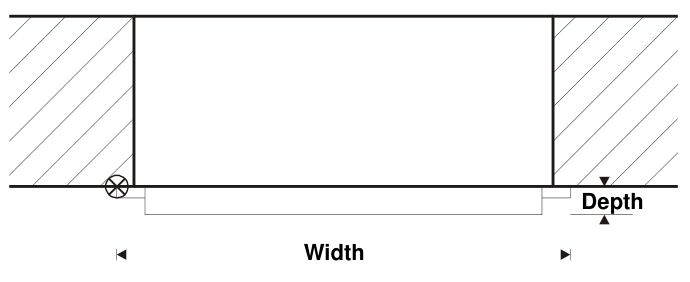
Doors are rectangular:
- The measure specifies the door leaf including the door frame, not the required wall opening.
- Width and height include the door frame.
- Depth (optional) specifies the depth of the door leaf (default value = 0).
- The reference point is located left/bottom/rear.
- Can optionally identify on which wall it's positioned
{
  "position": Position,
  "width": float,
  "height": float,
  "depth": float,
  "angle": float,
  "hinge": string,
  "opening": string,
  "wallIndex": int,
}
| property | type | cardinality | comment |
|---|---|---|---|
| position | Position | M | Absolute position coordinates of the reference point |
| width | float | M | |
| height | float | M | |
| depth | float | C | Default to 0 |
| angle | float | M | Rotation around Z |
| hinge | string | M | Door hinge:N: NoneL: LeftR: Right |
| opening | string | M | Door opening direction:N: NoneI: InsideO: OutsideS: Slide |
| wallIndex | int | C | Index of the wall it's attached to |
Window
A Window item is very similar to a Door object:
- Windows are rectangular
- The measure specifies the window as well as the required wall opening.
- Depth specifies the window frame depth (default value = 0).
- The reference point is located left/bottom/rear.
{
  "position": Position,
  "width": float,
  "height": float,
  "depth": float,
  "angle": float,
  "hinge": string,
  "opening": string,
  "wallIndex": int,
}
| property | type | cardinality | comment |
|---|---|---|---|
| position | Position | M | Absolute position coordinates of the reference point |
| width | float | M | |
| height | float | M | |
| depth | float | C | Default to 0 |
| angle | float | M | Rotation around Z |
| hinge | string | M | Window hinge:N: NoneL: LeftR: RightT: TopB: Bottom |
| opening | string | M | Window opening direction:N: NoneI: InsideO: OutsideS: Slide |
| wallIndex | int | C | Index of the wall it's attached to |

Recess, Hindrance, Radiator
All of those 3 objects have the exact same structure:
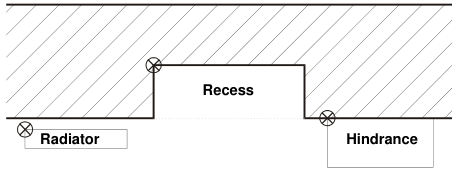
Recessesspecify cut-outs located within a wall.Hindrancesare usually located in front of a wall (e.g. fireplaces, wall projections), but can also be located in open floor space.Radiatorsare also located in front of a wall, but they can also be located in recesses or open floor space.
They all:
- Are rectangular parallelepipeds.
- All measures should be specified. There are no optional measures.
- The reference point is located left/bottom/rear.
{
  "position": Position,
  "width": float,
  "height": float,
  "depth": float,
  "angle": float,
  "wallIndex": int,
}
| property | type | cardinality | comment |
|---|---|---|---|
| position | Position | M | Absolute position coordinates of the reference point |
| width | float | M | |
| height | float | M | |
| depth | float | M | |
| angle | float | M | Rotation around Z |
| wallIndex | int | C | Index of the wall it's attached to |
RoofSlope
A roof slope is specified according to the sketch below:
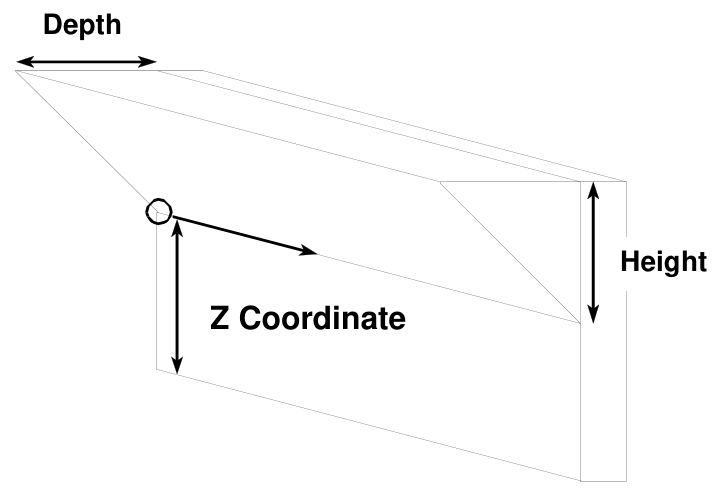
- The reference point is located left/bottom/rear.
- All measures should be specified. There are no optional measures.
- The roof slope is described by a prism. In this context, the Z coordinate specifies the flap tile height. The slope angle is defined by the height and depth.
Same object as Recess
Article
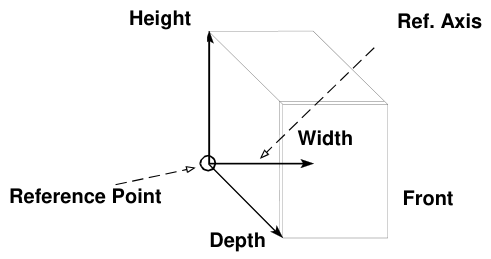
Manufacturing / order relevant articles are specified in this segment. On one hand, these are "conventional" cabinets, but also parts to be generated, such as work tops, light pelmets, cornices, etc.
- All these articles must reference an existing document line.
- The Z position represents the height from the floor level (ex: a base cabinet with a base height of 100 mm has a "Z" value of "100").
- In order to better describe the shape of some articles (worktop, plinth, cornice, ...), they can be transmitted as polylines.
{
  "documentLineIndex": int,
  "position": Position,
  "angle": float,
  "shape": int,
  "constructionType": string,
  "polyline": Polyline,
}
| property | type | cardinality | comment |
|---|---|---|---|
| documentLineIndex | int | M | Index of the document line that corresponds to this article (document.lines[{documentLineIndex}]) |
| position | Position | M | Absolute position coordinates of the reference point |
| angle | float | M | Rotation around Z |
| shape | int | C | Basic shape number for linears, according the IDM format |
| constructionType | string | C | Linear construction type, according the IDM format:N: NoneL: LeftR: Right |
| polyline | Polyline | C | Polyline representing the linear shape |
For the Shape id and corresponding construction type, see the IDM Specification, chapter "Basic shapes".
Polyline
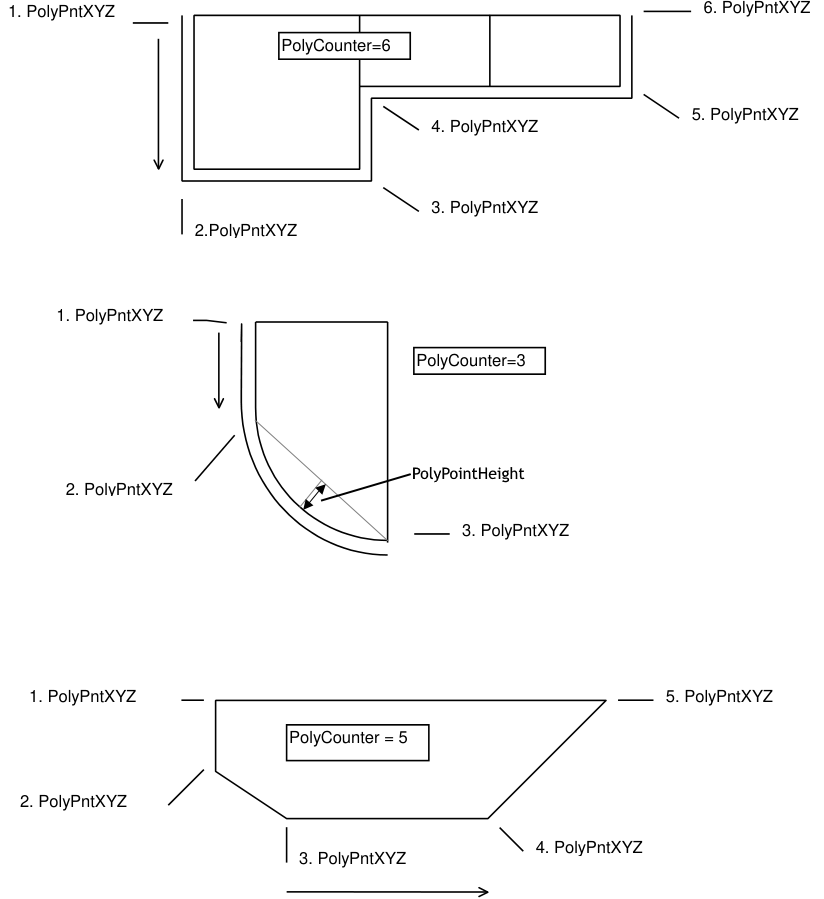
Polylines are used to better describe placement and shape of certain articles like worktops, plinths, cornices, ...
A Polyline:
- Has a type
- Is composed of points where the z coordinate origin depends on the Type
- Is a list of points, passed as the counter-clockwise order around the shape.
- Can be open of closed depending on the type:
- In the case of a closed polyline, do not add the endpoint. It is assumed the endpoint is the start point, so for n object edges, only n points are transmitted.
- For open polyline, transmit the endpoint. So for n object edges, n+1 points are transmitted.
- Edge is represented by its start point and its end point, which is the start of the next edge.
- Points can have a height component to represent a curved edge:
- The height of a point specifies the Height of the edge from point i to i+1
- The height specifies the perpendicular distance between the centre of the edge and the circle segment.
- If the height is 0 (or not specified), it is a straight line.
- As the Polygon alignment is pre-defined as counter-clockwise, the following rules apply:
- Positive height describes a convex curve.
- Negative height describes a concave curve.
Polyline:
{
  "type": int,
  "points": PolyPoint[],
}
| property | type | cardinality | comment |
|---|---|---|---|
| type | int | M | Type of the Polyline (cf. Polyline Types) |
| points | PolyPoint[] | M | Array of points for this Polyline |
PolyPoint
- A PolyPoint is an Array of floats like a Position [x, y, z], but with an optional 4th value : the height
- PolyPoint coordinates are absolute like for the Position
PolyPoint => [x, y, z] | [x, y, z, height]
PolyPoint => [float, float, float] | [float, float, float, float]
PolyPoint => [58.4, 158, 75] | [58.4, 158, 75, 12]
Polyline Types
| Type | Meaning | Z Coordinate | Polyline |
|---|---|---|---|
| 1 | Plinth | Top Edge | Open |
| 2 | Work Top | Bottom Edge | Closed |
| 4 | Light Pelmet | Top Edge | Open |
| 5 | Cornice | Bottom Edge | Open |