Company
In the Retail Ops environment, the Company (aka Master Franchise) is the level of settings generally corresponding with a Brand in the context of a given Country (cf.Architecture for more details about the Retail Ops architecture). A Company can be assigned some coordinates, a logo, legal informations, stores, users and many settings. In the Retail Ops context, it can be assigned several Stores and Users.
Company details
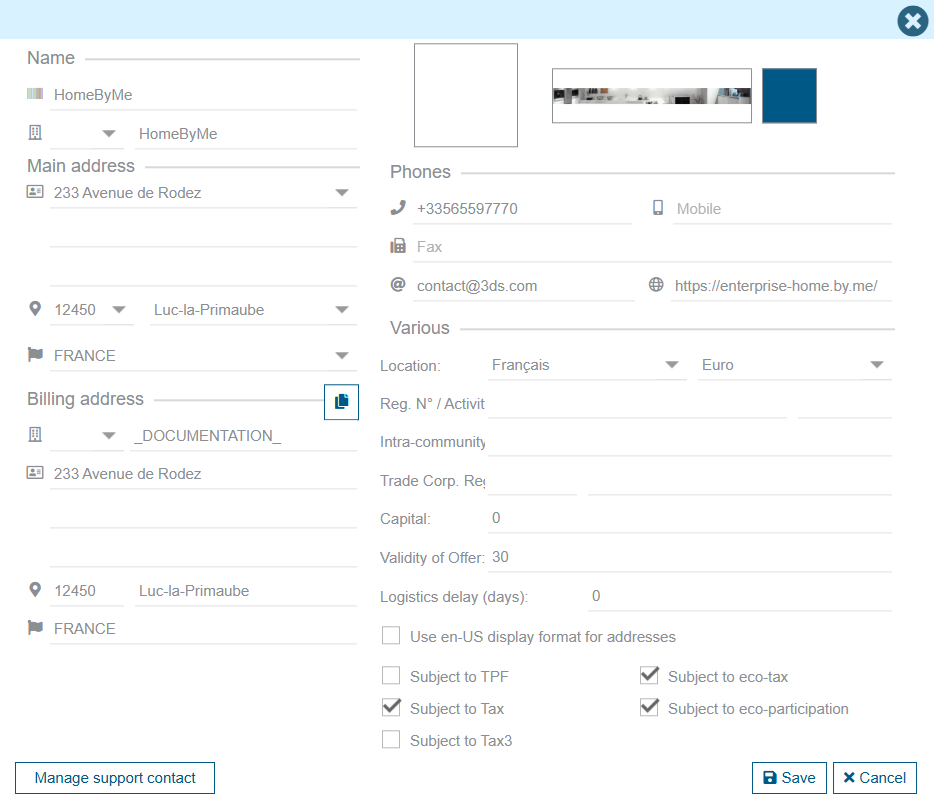
This screen allows you to edit your Company details, such as:
- Name, Logo, Main address, Billing address
- Phones, Web site URL, default contact email
- Default currency
- etc.
Taxes
You can also select the different types of taxes that will need to be referred, according your company location:
- 3 main levels of taxes (the default VAT rate will be assigned to the 2nd one)
- 2 optional additional types of fees, for eco-participations:
- an "eco-tax" (aka DEEE) for Electronical equipments
- an "eco-participation" (aka DEA) for Furniture items
Specific settings
Certain settings can be changed in this screen, e.g:
- Period of validity for quotations (default to 30 days): Number of days during which the price of a quote is guaranteed. Beyond this limit, prices are likely to change.
- Logistics delay (in days): used by the system in order to compute the default Reception date when generating the purchase orders.
Main environment
You can also change the default banner that will be displayed on top of your Retail Ops environment, such as its main color.
Since the banner is loaded with your Retail Ops environment, beware of using a light image in order for the site not to take much time in loading it
An additional option allows you to choose the way of displaying addresses for every Retail Ops contact:
- By default, Street(s), then Zip Code, City and Country
- Possibly Street(s), then City, State, Zip Code and Country