Store
In the Retail Ops environment, a Store is a sub-entity of a Company (cf.Architecture for more details about the Retail Ops architecture), corresponding to the physical location of a point of sales. A Store is linked to one Company and can be assigned some coordinates, a logo, legal informations, users and many settings. In the Retail Ops context, it can be assigned several Users.
Store details
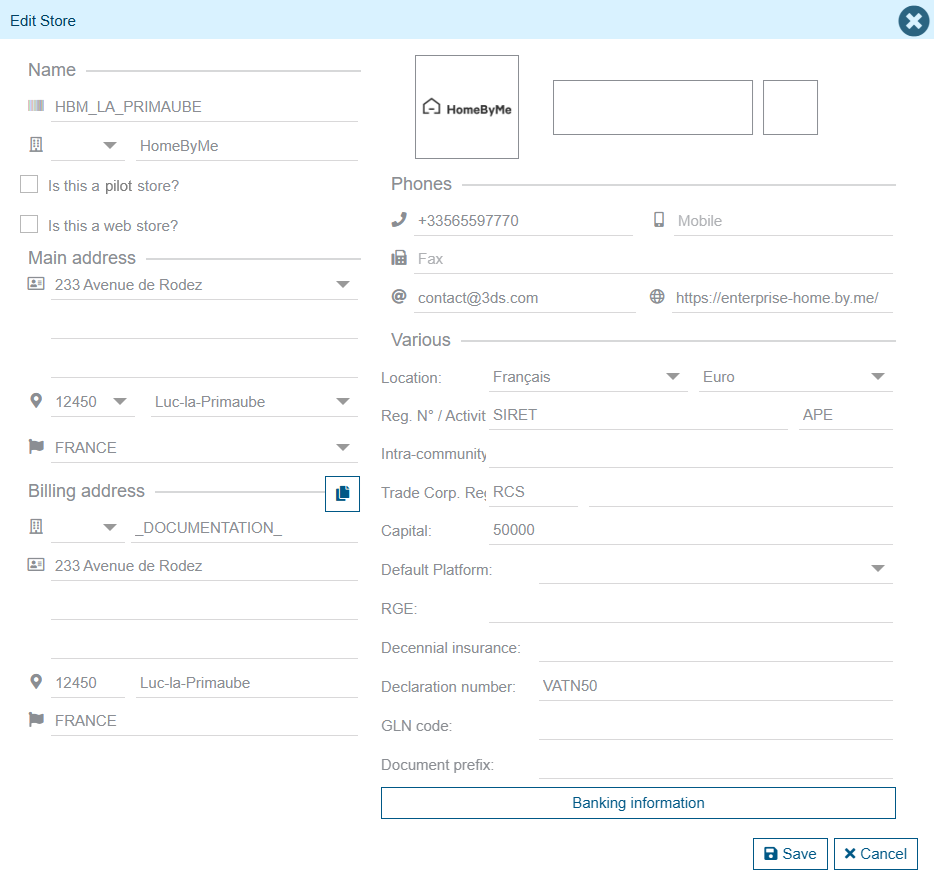
This screen allows you to edit your Store details, such as:
- Name, Logo, Main address, Billing address
- Phones, Web site URL, default contact email
- etc.
At the store level, all legal information that must appear on the documents produced by the application can also be filled in here: several identification numbers, capital, ten-year insurance, etc.
Default Platform
If platform-type suppliers (cf. Supplier types) have been integrated into the application, it is possible to define the default platform associated with the selected store. This allows the correct platform address to be automatically assigned when creating orders to the different suppliers.
Specific behaviors
Pilot store
The concept of a pilot store makes it possible to introduce certain functionalities for store networks, and have them only available for a selection of stores. Please contact your commercial to learn about the available related features.
Web store
A web store allows users to create web projects: particular customers can create one or more web projects directly from your related website. When they eventually come to one of your stores to validate a web project, you will be able to copy it to a real standard project assigned to your store:
- When creating a project, simply select the "Web Project" option.
- Here you will be able to search (e.g. by using the client’s email address) the different projects he has created from your website.
- Just select the one to convert.