Installation / Services
Introduction
 Installation rules and services rules can be set in the Retail operations administration screen. There is a tab for installations and a separate tab for services, but the settings screen is the same as the one detailed below.
These allow you to define which installation products and services are best suited to the conditions in place. These products will be proposed during document creation.
Settings screen
The settings screen is the same for setting installation rules and service rules.
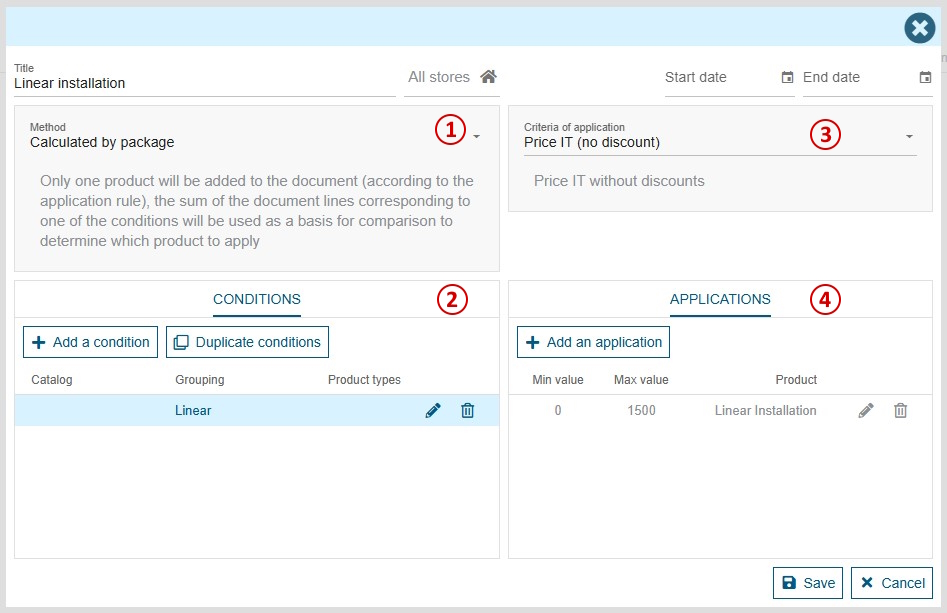
Composition of a rule:
- Title: displayed only in the rule settings screen
- Stores: a filter so that the rule applies only to a list of specific stores; by default, a rule applies to all stores.
- Dates: (optional) allows you to define when the rule begins or ends.
- Method: the calculation method "by line" or "by package" rule, see details below.
- Application criteria: defines the type of price on which the rule is based; the criteria are not the same depending on the method.
- Conditions: allows you to identify products in the document which may be used to add installation/service products.
- Applications: defines the service products to be added to the document according to price. Behavior is affected by method and application criteria, see below.
How to set up a rule
1 - Choose the method
There are 2 methods: "Calculated by line" and "Calculated by package".
Calculated by line
The "Calculated by line" method is used to suggest products to add to the document as Addons.
Each condition will have its own application test.
The application test is based on the price of each product corresponding to the associated condition.
The price will depend on the application criteria chosen.
Calculated by package
The "Calculated by package" method is used to suggest products to add to the document, without linking them to a specific product in the document.
There is only one application test for this rule.
The application test is based on the sum of the prices of products corresponding to one of the conditions.
The price will depend on the application criteria chosen.
Once the rule has been created, the method can no longer be modified!
2 - Defining conditions
A condition is used to find the products in the document that will be tested by the application.
A condition is used to target products according to their classification, catalog and/or type.
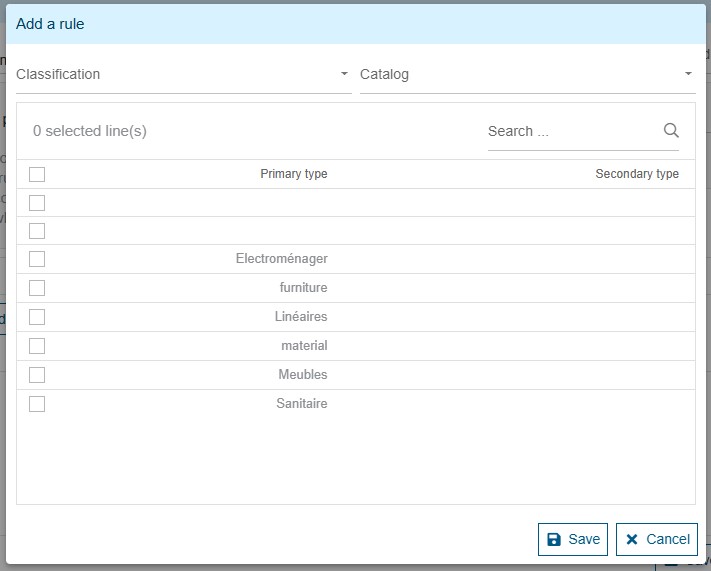
To define a catalog-specific rule, select the catalog for all conditions concerned. All conditions without a specific catalog will target all lines (depending on the classification and/or types selected).
The "Duplicate conditions" feature allows you to duplicate conditions for a specific catalog. On this screen, select the conditions to be duplicated, select the catalog to which the conditions are to apply, then save.

A condition set on the "Linear" classification will target all products in the "Linear" classification.
A condition set on the "Furniture" classification and the "sanitary" type will target only the "sanitary" type products present in the "Linear" classification.
A condition set on the "Furniture" classification and the "HomeByMe" catalog will only target products in the "Linear" classification that also belong to the "HomeByMe" catalog.
3 - Choosing the application criteria (scope of price)
The application criteria defines which product price is used as the point of comparison during the application test. Not all methods have access to the same criteria.
Calculated by line
-
Price IT (no discount) :
Price IT without discounts -
Price IT, discounted (line + category) :
Price IT discounted, does not take foot discount into account -
Price IT, discounted (line + category + document) :
Unit Price IT discounted, with foot discount applied pro rata to the lines concerned, excluding shipping fees/fixed fees -
Unit Price IT (no discount) :
Unit Price IT without discounts -
Unit Price IT, discounted (line + category) :
Unit Price IT discounted, does not take foot discount into account -
Unit Price IT, discounted (line + category + document) :
Unit Price IT discounted, with foot discount applied pro rata to the lines concerned, excluding shipping fees/fixed fees
When choosing one of the "Unit Price IT" criteria, products will be added with the same quantity as the tested products (rounded up)
Calculated by package
-
Price IT, discounted (line + category) :
Price IT without discounts -
Price IT, discounted (line + category + document) :
Price IT discounted, with foot discount applied pro rata to the lines concerned, excluding shipping fees/fixed fees
4 - Define applications
An application lets you define which installation product/service should be applied according to price criteria.
Only one product can be selected.

Price range
A price range is used to define which product to apply if the price to be tested falls within it (the price to be tested depends on the method, criteria and conditions).
Several ranges can be defined for the rule (if "Calculated by package" method) or by condition (if "Calculated by line" method).
Having several applications means you can, for example, set a product 1 to be added if the price tested is between 0 and 500, or a product 2 if the price is between 500 and 999999.
Leaving an range from 0 to 0 is equivalent to saying "any price".
If two ranges overlap, the system will suggest only one product per application.
Product selection
To choose a product, first select the catalog. In the case of installation rules, only "Installation" catalogs are available. For service rules, these are the "service", "option" or "accessory" catalogs.
A search field allows you to filter the list of products in the selected catalog.
Then click on the product you wish to apply. Once selected, it is highlighted.
Execution of rules in documents
All active rules are tested when applying the installation or services in the document.
Example 1 : Calculated by line
- Method: "By line"
- Application criteria: Price incl. VAT (without discounts)
- Condition 1 : "Linear" group
- Application 1 : between 0 and 500 => product "ADDON-01"
- Application 2: between 500 and 99999 => product "ADDON-02"
- Condition 2: "Furniture" group, "HBM" catalog
- Application 1: between 500 and 99999 => product "ADDON-03"
- Condition 3: catalog "HBM", type "Electro"
- Application 1: between 0 and 0 => product "ADDON-04"
When applied in the document, this rule will propose :
- 1 "ADDON-01" product for each product in the "Linear" group between 0 $ and 500.00 $ incl. VAT.
- 1 product "ADDON-02" for each product in the "Linear" group between 500.00 $ and 9999.00 $ incl. VAT.
- 1 product "ADDON-03" per product from catalog "HBM" in group "Furniture" between 500.00 $ and 99999.00 $ incl. VAT (before discount)
- 1 product "ADDON-04" per product from the "HBM" catalog with the "Electro" type, regardless of price.
In this example, no product is offered for "HBM" catalog products in the "Furniture" group that are less than 500.00 $ incl. VAT (before discount).
Example 2 : Calculated by package
- Method: "By package"
- Application criteria: Price incl. VAT discounted (line + category + document)
- Condition 1 : "Linear" group
- Condition 2 : "Furniture" group, "HBM" catalog
- Application 1 : between 0 and 2000 => product "PACK-01"
- Application 2 : between 2000 and 99999 => product "PACK-02".
To find out which product will be applied, we add up the discounted price of all the lines in the "Linear" group and all the lines from the "HBM" catalog in the "Furniture" group.
If this sum is between 0 $ and 2000.00 $ (including discounted VAT), then "PACK-01" is added. Otherwise, if this amount is between 2000.00 $ and 99999.00 $ (VAT discounted), we add "PACK-02".
A "By package" rule can only add one product to the document
Example 3 : Execution of several rules
If I have 3 rules:
Rule 1
Method: "By line"
Application criteria: Price incl. VAT (without discounts)
Condition 1 : "Linear" classification
Application 1: between 0 and 500 => "ADDON-01" product
Application 2: between 500 and 99999 => product "ADDON-02".
Rule 2
Method: "By line"
Application criteria: Price incl. VAT (without discounts)
Condition 1: "Furniture" group, "HBM" catalog
Application 1 : between 500 and 99999 => "ADDON-03" product
Condition 2: "HBM" catalog, "Electro" type
Application 1: between 0 and 0 => product "ADDON-04".
Rule 3
Method: "By package"
Application criteria: Price incl. VAT discounted (line + category + foot)
Condition 1 : None
Application 1 : between 0 and 0 => "PACK-01" product
Result:
(Rule 1 / Condition 1 / Application 1) = 1 product "ADDON-01" per product in the group "Linear" between 0 $ and 500.00 $ VAT included (Before discount)
(Rule 1 / Condition 1 / Application 2) = 1 product "ADDON-02" per product in the group "Linear" between 500.00 $ and 99999.00 $ TTC (Before discount)
(Rule 2 / Condition 1 / Application 1) = 1 product "ADDON-03" per product from the "HBM" catalog in the "Furniture" classification between 500.00 $ and 9999.00 $ inc VAT (Before discount)
(Rule 2 / Condition 2 / Application 1) = 1 product "ADDON-04" per product from the "HBM" catalog with the "Electro" type, regardless of price.
(Rule 3 / Application 1) = 1 "PACK-01" product